01
Track a TCS parcel
Type the CN number from your receipt or SMS in the box above. Remove spaces and dashes, keep any leading zeros, and press Track Shipment to see the latest recorded event.
Go to the tracker →
Track TCS Parcel & Courier Delivery Status Online
Advertisement
Track TCS overnight express, same-day delivery, international courier & more on tcstrack.pk
Next-day delivery to all major cities across Pakistan as booked with TCS.
TCS Hazir service for urgent same-day deliveries within select metropolitan areas.
Economy shipping option for cost-effective deliveries within 2 business days.
Ship to 200+ countries worldwide with reliable international tracking support.
Send gifts, flowers, and special packages to your loved ones across Pakistan.
Bulk shipping solutions for businesses and e-commerce with dedicated support.
Track your TCS parcel delivery status in Pakistan — enter tracking number, click track, get instant results
Type your TCS consignment number in the search box
Hit the track button to fetch the latest TCS status
See status, timeline, origin, destination & more
The six things most people need when tracking a TCS parcel in Pakistan, each with a short answer and a link to the full guide.
Type the CN number from your receipt or SMS in the box above. Remove spaces and dashes, keep any leading zeros, and press Track Shipment to see the latest recorded event.
Go to the tracker →The consignment number is printed on the TCS booking receipt and is usually sent by SMS or email. Online shops show it in the order or dispatch details, not as the order ID.
CN number guide →Each status is the last scan in the TCS network, not a live GPS location. The table below explains each common status and what you should do next.
Status meanings →New bookings can take a few hours to appear. Check the digits, confirm the CN with the sender, and try again later before you contact TCS.
Troubleshooting →Choose your city to see official Express Centre addresses, phone numbers and opening hours taken from the TCS office finder.
TCS offices by city →Charges depend on weight, route and service. Our calculator gives an estimate. Confirm the final price at the counter before booking.
Price calculator →Most domestic shipments pass through these six stages. Your tracking result shows the latest stage TCS has recorded, with its date, time and location.
The shipment is registered at a TCS counter or by the seller's account.
TCS has physically received the parcel from the sender.
The parcel is being sorted at an origin or transit hub.
The parcel is moving between cities or sorting centres.
A rider in the destination city has the parcel for delivery.
The delivery is recorded, often with the receiver's name.
Some parcels skip or repeat stages, for example several facility scans on long routes. International parcels also pass through customs.
Wording can differ slightly between the TCS website, app and SMS, but the statuses below cover almost every update you will see. Always read the date and location next to the status.
| Status | What it means | What you should do |
|---|---|---|
| Booked / Shipment Booked | A booking record exists. It does not always mean TCS has the parcel yet. | What to do: If nothing changes for 24–48 hours, ask the sender to confirm they handed it over. |
| Picked Up / Received at Origin | TCS has collected the parcel from the sender or received it at a counter. | What to do: No action needed. The next scan is usually at a sorting facility. |
| Arrived at Facility | The parcel has been scanned at a sorting or distribution centre. | What to do: Normal step. Check that the facility city is on the expected route. |
| Departed from Facility | The parcel has left a hub towards the next location. | What to do: Wait for the next arrival scan, usually in the destination city. |
| In Transit | The parcel is moving through the TCS network between locations. | What to do: Check the date of the last scan. A long gap may mean a delay worth reporting. |
| Arrived at Destination | The parcel has reached the delivery city or the station that serves it. | What to do: Keep your phone on. Delivery is often the next working day. |
| Out for Delivery | A rider has the parcel for delivery today. | What to do: Stay reachable and keep exact cash ready for COD orders. |
| Delivered | The record shows the parcel was delivered, often with the receiver's name. | What to do: If you did not receive it, report it to TCS quickly with your CN. |
| Delivery Attempted / Unsuccessful | The rider could not complete delivery, for example address not found or receiver unavailable. | What to do: Call TCS or the sender to confirm your address and arrange another attempt. |
| On Hold / Held at Station | The parcel is paused, for example an address issue, consignee request or inspection. | What to do: Contact the destination TCS office with your CN and ID to release or collect it. |
| Customs Clearance | An international parcel is being checked by customs. | What to do: Keep the invoice and ID ready. Duties may apply before release. |
| Return to Shipper | The parcel is being sent back to the sender. | What to do: Contact the sender or shop about a re-delivery or refund. |
Your CN (consignment number) is the only number TCS tracking accepts. Mobile numbers, CNICs and shop order IDs will not work. Look in these places:
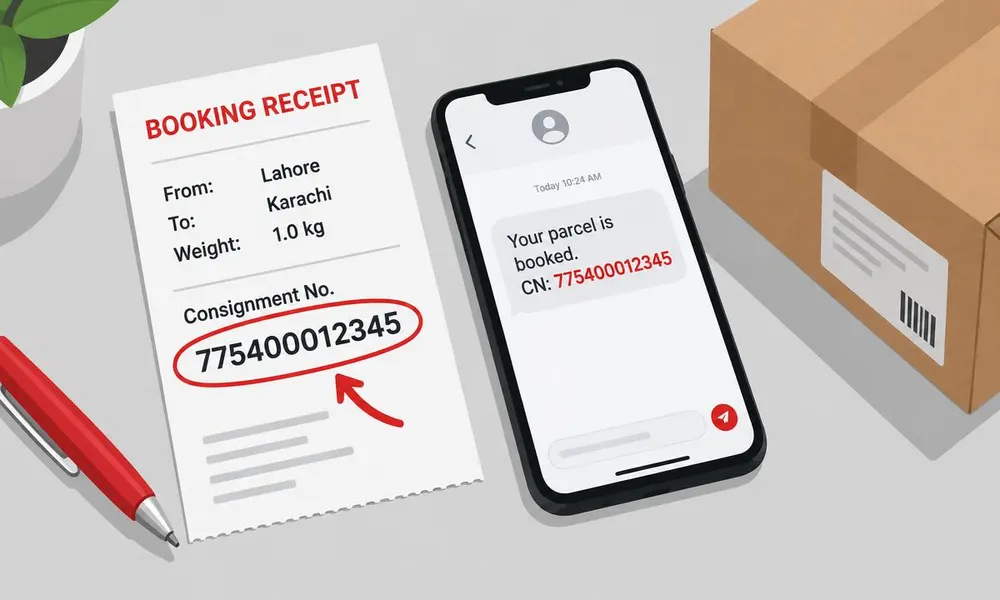
Tip: when you type it, remove spaces and dashes but keep any leading zeros. See the TCS tracking number format guide.
TCS delivery times are targets, not guarantees. These factors decide when your parcel actually arrives:
For typical times by service, read how many days TCS takes to deliver and TCS working days.
Most tracking problems have a simple cause. Try these steps before you call the TCS helpline.
| Problem | Likely cause | How to fix it |
|---|---|---|
| No record found | The CN was just booked, has a typing mistake, or belongs to another courier. | Check every digit, wait a few hours after booking, and confirm the courier with the sender. |
| Status not updating | Scans only happen at checkpoints, so long road trips show no new event. | Wait 24–48 hours on intercity routes. Report it if there is no change after that. |
| Shows delivered, not received | The parcel was handed to a neighbour, guard or family member, or there was a scanning error. | Ask people at the address, then file a complaint with TCS quickly using your CN. |
| Stuck on hold | There is an address problem, a missing phone number, or a request to collect it. | Call the destination office and give a correct address or collect it with your CNIC. |
| Wrong city shown | The parcel is passing through a hub city on its route. | This is usually normal routing. Check again after the next scan. |
Still stuck? See TCS helpline numbers or learn how to file a TCS complaint. Never share an OTP or pay through a link someone sends you claiming to be from TCS.
Tracking tells you where a parcel is; an Express Centre is where you go when it is held, needs a CNIC check, or must be booked. The counts below come from the official TCS locator, checked on 3 November 2026. Each city guide lists every centre with its address, phone, opening hours and map link.
111 Express Centres · Sindh
View offices56 Express Centres · Punjab
View offices22 Express Centres · Islamabad Capital Territory
View offices31 Express Centres · Punjab
View offices30 Express Centres · Punjab
View offices20 Express Centres · Punjab
View offices22 Express Centres · Punjab
View offices13 Express Centres · Punjab
View offices22 Express Centres · Sindh
View offices35 Express Centres · Balochistan
View offices12 Express Centres · Punjab
View offices9 Express Centres · Punjab
View offices8 Express Centres · Sindh
View offices5 Express Centres · Punjab
View offices3 Express Centres · Punjab
View offices3 Express Centres · Punjab
View officesVisit the centre that serves your delivery address when the status says the shipment is held, the consignee was not available more than once, or the address needs correcting. Bring the CN number and your original CNIC; if someone collects for you, they normally need an authority letter and a copy of your CNIC. Call ahead using the number listed for that centre, because hours differ, and some centres close earlier on weekends.
We only publish city pages where the official locator returned verified centre data. For other cities, use the official TCS locator or call the TCS helpline 111-123-456. See also our TCS offices near me guide.
Advertisement
A free, independent way to check TCS parcel delivery status across Pakistan
See the most recent update TCS has published for your consignment.
Status is read from TCS's own public tracking — nothing is invented.
Track domestic TCS parcels between any cities in Pakistan.
View the shipment journey with the timestamps and locations TCS provides.
Track TCS shipments across Karachi, Lahore, Islamabad, Rawalpindi, Faisalabad, Peshawar, Quetta & more
TCS's overnight service targets next-day delivery between major cities when booked before the branch cut-off. The exact commitment depends on your booking.
Next Day
Major City Routes
The receiver pays the rider at the door; TCS later settles the amount to the seller. COD parcels are tracked with the same CN number.
COD
Pay the Rider
International parcels can pause at customs clearance. Keep the invoice and receiver CNIC/ID details ready if TCS asks for them.
Customs
Can Add Time
A newly booked parcel can take a few hours to appear in tracking. If it still shows nothing after 24 hours, check the CN and contact TCS.
2–4 hrs
Before CN Shows
Everything you need to know about TCS tracking, delivery services, and courier logistics in Pakistan
TCS (TCS Private Limited), originally known as Tranzum Courier Service, is a Pakistani courier, logistics and e-commerce company established in 1983. It runs Express Centres across the country and offers domestic, international and cash-on-delivery services.
Whether you're a student sending documents, a family shipping gifts via TCS Sentiments, or a business owner managing thousands of e-commerce orders — TCS is widely used for deliveries across Karachi, Lahore, Islamabad, Rawalpindi, Faisalabad, Peshawar, Quetta, Multan, and hundreds of other cities.
TCS has played a pivotal role in Pakistan's e-commerce boom, enabling platforms like Daraz, OLX, and thousands of independent online stores to ship products nationwide with Cash on Delivery (COD) support.
tcstrack.pk is a free, independent TCS tracking platform. Simply enter your TCS consignment number (CN number) in the search box above and click "Track Shipment." The tool reads the status TCS publishes for that number and shows you:
Our tracking tool works for all TCS services including Overnight Express, TCS Hazir same-day delivery, international shipments, and COD parcels — free of charge.
Cash on Delivery (COD) parcels are tracked with the same consignment number as any other TCS shipment. Tracking shows pickup, transit and delivery scans; the COD amount is collected by the rider and settled to the seller under their TCS account terms. See TCS COD tracking and how to get a TCS COD account.
tcstrack.pk is an independent website that helps people in Pakistan check TCS parcels, understand tracking statuses and find Express Centre details. It is not affiliated with, endorsed by or operated by TCS. Shipment status is read from TCS's public tracking and is never created by this site; for bookings, claims or complaints use TCS's official channels.
Explore more: TCS Charges • Rate Calculator • TCS Office Near Me • TCS Timings • International Rates • Guides
Advertisement
Expert tips for tracking TCS courier shipments and checking TCS delivery status effectively in Pakistan
New shipments may take 2-4 hours to appear in the tracking system after booking. Be patient and check again later.
Keep your TCS booking receipt safe. The consignment number printed on it is essential for tracking your shipment.
For delivery issues, contact TCS helpline at 021-111-123-456. They can resolve delays, address changes, and complaints.
Most commonly asked questions about TCS courier tracking in Pakistan — answered for you
To track your TCS shipment online, simply visit tcstrack.pk and enter your TCS consignment number (found on your booking receipt) in the tracking box. Click 'Track Shipment' and you'll instantly see your shipment's current status, origin, destination, and complete journey history with timestamps.
Your TCS tracking number (also called consignment number or CN number) is printed on the receipt you received at the time of booking. It's typically a numeric code. You may also receive it via SMS or email confirmation from TCS. If you booked online, check your order confirmation email.
TCS delivery times depend on the service type: Overnight Express delivers within 24 hours to major cities. TCS Hazir provides same-day delivery in metro areas. Standard delivery takes 2-3 business days for domestic shipments. Remote areas may take 3-5 days. International deliveries take 5-10 business days.
'In Transit' means your parcel has been picked up from the sender and is currently moving through the TCS logistics network. It could be at a sorting facility, on a delivery vehicle, or being transferred between cities. This is a normal status and your parcel is on its way.
If TCS tracking shows no result: 1) Double-check the consignment number for typos. 2) Wait 2-4 hours after booking as new shipments take time to appear. 3) Ensure you're entering the correct format. 4) If the issue persists after 24 hours, contact TCS helpline at 021-111-123-456.
TCS primarily uses consignment numbers for tracking. However, if you booked using your CNIC or mobile number, you can contact TCS customer support at 021-111-123-456 and they can look up your shipment details. For fastest results, always use your consignment number on tcstrack.pk.
If TCS cannot deliver your parcel, they will make up to 3 delivery attempts. After failed attempts, the parcel is held at the nearest TCS Express Center for collection. You'll receive an SMS notification. If uncollected, the parcel may be returned to the sender.
TCS delivers on Saturdays in most major cities but is generally closed on Sundays. During public holidays, TCS may operate with limited service in major cities like Karachi, Lahore, and Islamabad. Delivery timelines may be extended during holidays.
You can reach TCS customer support through multiple channels: Call the helpline at 021-111-123-456 (available during business hours). Visit your nearest TCS Express Center. Use the TCS website's complaint form. You can also reach them via their social media pages.
No. tcstrack.pk is an independent, free website and is not affiliated with TCS. It shows the status TCS publishes for your consignment number. For booking, claims or complaints, use the official TCS website or helpline.
TCS COD allows the receiver to pay for a shipment upon delivery. You can track COD shipments the same way as regular shipments — enter your consignment number on tcstrack.pk. The tracking will show pickup, transit, and delivery status.
TCS runs Express Centres across Pakistan, from major cities such as Karachi, Lahore, Islamabad, Rawalpindi, Faisalabad, Peshawar, Quetta and Multan to smaller towns. Use the official TCS locator or our city office pages to find addresses, timings and phone numbers near you.
Have more questions? Visit our FAQ page or contact us for help.
Advertisement
Enter your TCS consignment number above and see the latest status of your delivery.
Advertisement